
Orbit Trainer guide
Trainer custom set: save node pools and reuse across playlists
Overview
Save your Trainer node pool as a private Set, reload it anytime, and reuse the same title across playlist spots so playlist Trainer can train the summed pool. See the Trainer screen map for where filtering and settings live.
Where Set lives
Open Filter on Trainer. Set sits below the Training Node Pool. Build your pool in Current spot first. For filter rows and categories, see the preflop trainer filters tutorial.
Save a node pool
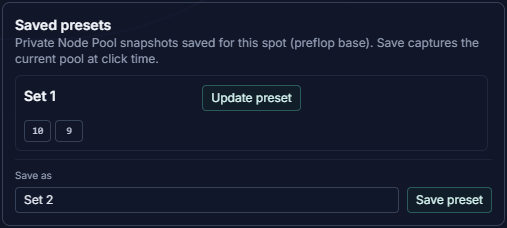
Under Set, type a name in Save as (Orbit suggests the next free Set N title), then click Set. This captures whatever is in the pool at click time. Add at least one node before Set unlocks.
Load and manage presets
Click a saved preset row to load it into the pool. Use Update preset to replace a saved set with the current pool. Rename with the pencil icon, or delete after you confirm. Open Filter → Set on Trainer anytime to reload a reload a set.
Sign in to save
Sign in to save, rename, update, or delete sets. Saved sets are private to your account, not shared with other users.
Reuse on playlist Trainer
On playlist Trainer, save the same preset title on each playlist member spot. Pick one base spot, not All playlist spots, to save or edit presets for that anchor.
In All playlist spots mode, Set lists titles summed across playlist base spots. Click a row to load the union into the pool. On the playlist Trainer Trainer header, choose Custom or a saved set title to train that summed pool across the playlist. To open playlist Trainer from the Library, see library playlists.
What to remember
Build a node pool, save it as a private Set, and reload it from Filter → Set. Use the same title on each playlist member spot, then pick that set on playlist Trainer to train the summed pool.